Ask ChatGPT how fast your page is
WebSpeed is in the ChatGPT app directory. Ask “How fast is example.com?” and it measures the page with Google PageSpeed Insights twice, as it is and through WebSpeed Fast, on mobile and desktop. The scores come back as a card in the chat.
Free. No WebSpeed account or sign-in.
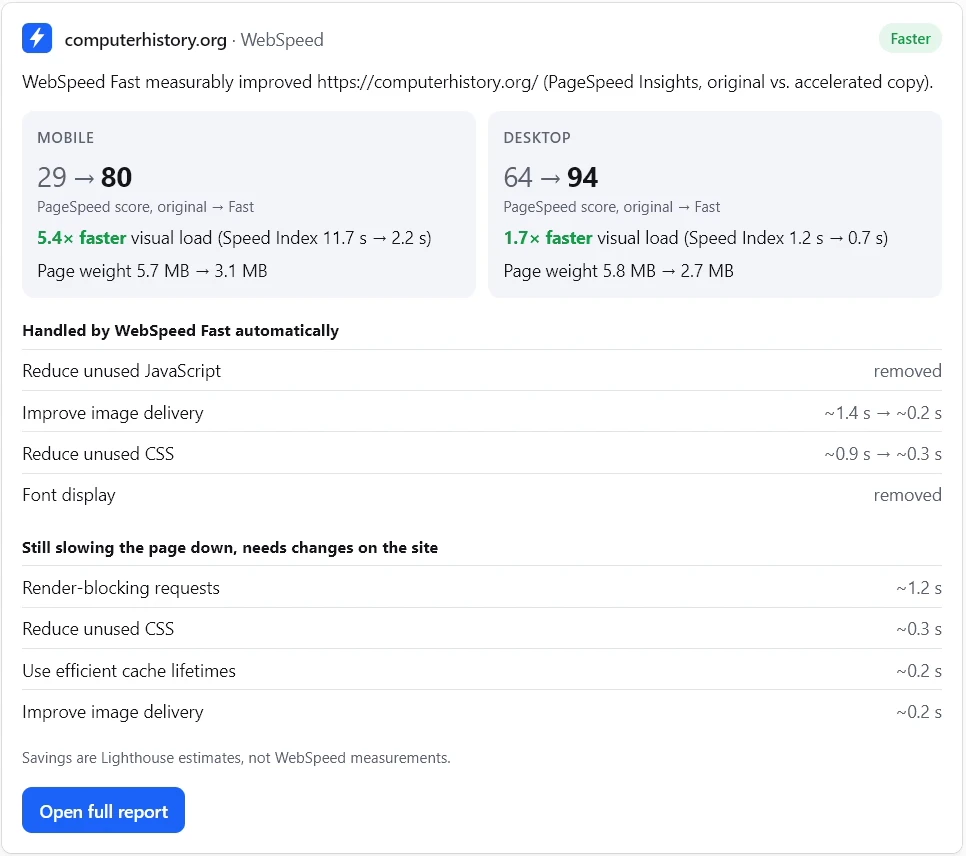
What to ask, and what comes back
Write it the way you would ask a colleague. For example:
- “How fast is example.com?”
- “Would WebSpeed make example.com faster?”
- “Is the WebSpeed measurement ready?”
The card shows, for mobile and for desktop:
- the PageSpeed score of the page and of its Fast version;
- how much sooner the page fills the screen, by Speed Index;
- page weight before and after;
- what WebSpeed Fast handled by itself, and what still needs changes on the site;
- a link to the full report on this site.
A page measured before comes back at once. A new one takes two to five minutes, and the card updates by itself while it runs.
No speed-up figure until the comparison passes a check
The assistant gets only numbers that passed it, so it has nothing else to quote. The card opens with one of four outcomes:
- Faster: the Fast version measured faster.
- Mixed result: faster on one device, slower on the other.
- Not faster: the Fast version did not beat the original.
- No comparison: the run can’t support one, for example because the original page is already fast or a run didn’t load properly.
Even then, the list of what slows the original page down is worth reading. Savings in that list are Lighthouse estimates, not our measurements.
What the app won’t do
- Measure private pages. PageSpeed Insights loads the page from the internet, so localhost, private networks and pages behind a login are out of reach.
- Run without limit. Each user can start three new measurements a day; pages measured before don’t count toward it.
- Keep a measurement private. Each one is published as a public report. To have one about your site removed, write to hi@webspeed.pro.
- Change your site. It only reads the page; nothing is installed or switched on.
Scores move between runs even for an unchanged page. How much, and why, is in how we measure.
In Claude
Claude’s connector directory doesn’t list WebSpeed. Until it does, add it by address:
- In Claude, open Settings, then Connectors.
- Choose Add custom connector.
- Name it WebSpeed and paste
https://api.webspeed.pro/mcpas the server URL.
Then ask the same way. The card and the numbers are the same as in ChatGPT.
Try it on your own page
The website speed test runs the same measurement here, without a chat. Something looks off in a result? See support.