How fast could your site be?

Enter your address. We measure it as it is and through WebSpeed, side by side.

No signup. See your before/after PageSpeed score in about a minute.

Website speed test

Your PageSpeed score now, and what it would be with WebSpeed. We measure your page as it is and the same page through our optimizing proxy, then show what slows it down.

No signup. See your before/after PageSpeed score in about a minute.

Public pages only. A page we have not measured before takes two to five minutes; one already in our base opens at once. What the report shows ↓

The same test runs in ChatGPT: ask “How fast is example.com?”. How to add it

Report cards for greenpeace.org: mobile PageSpeed 98, was 57; desktop 100, was 87; visually faster at least 2.1×; page weight 249 KB, was 926 KB.
The top of the greenpeace.org report, measured 4 Oct 2026
How the test works

From the address to the report

  1. 1

    Paste an address

    Your home page or any deeper page, as long as it opens publicly on the internet. No account, nothing to install.

  2. 2

    Google measures it twice

    PageSpeed Insights loads your page as it is and the same page through WebSpeed Fast, on mobile and desktop, more than once each.

  3. 3

    The report gets its own address

    It opens at webspeed.pro/en/audit/your-site/ and fills in as the rounds land. Keep the link, or press "Watch for changes" to get an email when the numbers move.

What you'll see in your report

The report, block by block

Every screenshot below is from one real report: greenpeace.org, measured 4 Oct 2026. Yours has the same blocks with your numbers.

The score, before and after

Google PageSpeed for mobile and desktop, measured twice: on your page as it is, and on the same page served through WebSpeed Fast, our optimizing proxy. "Was" is your page today. Next to the scores: how much sooner the screen fills in (the ratio of the two Speed Index values) and how many bytes the page weighs.

Under these cards the report adds a row of forecasts: traffic, conversion, bounce rate. Those are labelled as forecasts, not measurements, and each one links the published study it is computed from.
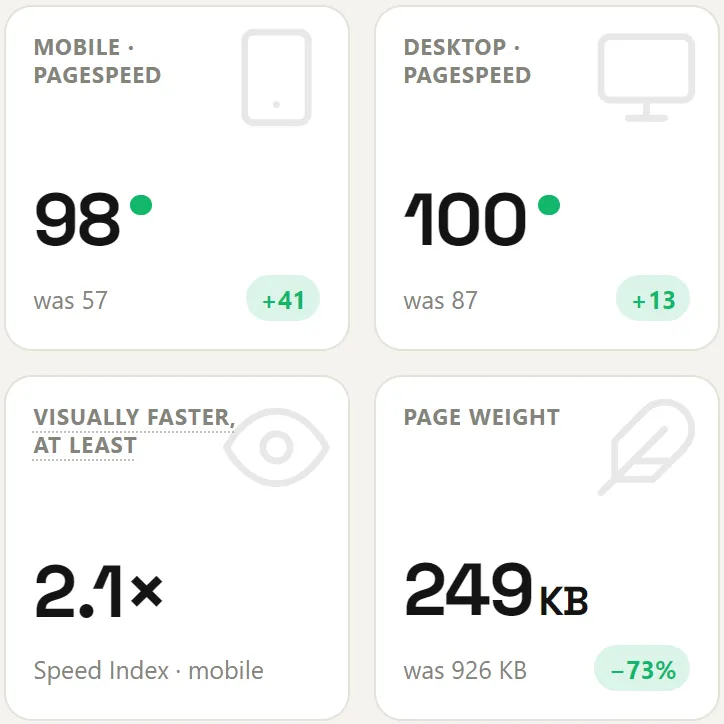
Report cards for greenpeace.org: mobile PageSpeed 98, was 57; desktop 100, was 87; visually faster at least 2.1×; page weight 249 KB, was 926 KB.

What the visitor sees first

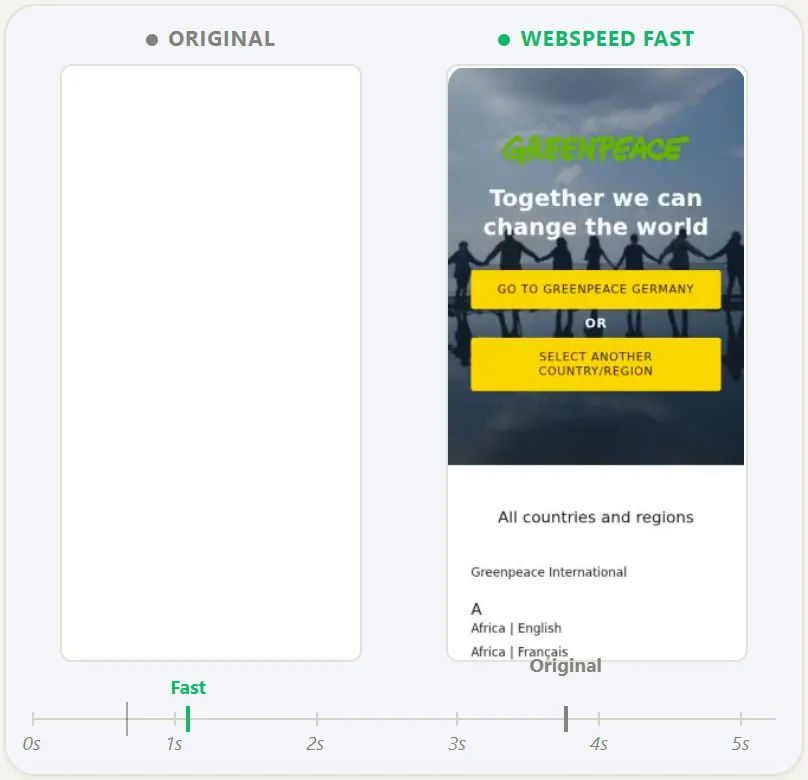
The left panel is Lighthouse's own recording of your page loading under mobile throttling, frame by frame. The right panel replays the same frames at the Speed Index ratio we measured, so you can see what "2.1× faster" looks like on a phone rather than take it as a number.

It is a replay of your frames at a measured speed, not a recording of the optimized page, and the report says so under the panel.

Two phone frames side by side: the original page still blank, the WebSpeed Fast version already showing the greenpeace.org first screen; a timeline below marks Fast at about 1 s and the original near 4 s.

Where your page stands among every site we have measured

One score means little without a scale. These four histograms place your page among every site in our base, measured as it is, without our optimization: PageSpeed score, how fast the screen fills (Speed Index), when the main content appears (LCP) and page weight, for mobile and desktop. The green bars are the fastest quarter, and the line under each chart says whether you are in it.

Four histograms — PageSpeed score, Speed Index, LCP and page weight, mobile and desktop — with a "You" marker on each and the fastest quarter shaded green.

The metrics behind the score

The score is a weighted blend of five lab metrics: FCP, LCP, Speed Index, TBT and CLS. Each row shows Google's "good" threshold, your value now, the value with Fast and the change.

The LCP breakdown splits the main-content time into server response, the wait before the image is requested, the download and the delay until it is painted, so you can see which of the four is yours to fix.

Speed table: PageSpeed score 57 now, 98 with Fast; FCP, LCP, Speed Index, TBT and CLS with thresholds, current and Fast values and the change; below it an LCP breakdown.

What the page is made of

Every byte the page loaded during the test, split by type, with the number of requests for each. A separate block counts third-party hosts, other companies' servers your page calls, and how much they weigh.

Rows that got worse stay in the table. On this page the images grew with Fast while the JavaScript all but disappeared from the first load, and the report shows both.

Page weight bar split by HTML, JavaScript, CSS, fonts and images, 926 KB now and 249 KB with Fast; below, requests and bytes per type and third-party hosts and weight.

Which scripts hold the page up

Lighthouse attributes main-thread blocking time to the scripts that caused it. The report names them, tag managers, chat widgets, analytics, your own bundles, with the milliseconds each one blocked, now and with Fast.

Fast does not remove scripts: every one still loads and runs. It starts what it safely can after the page is ready to use. A script that runs after the lab run has ended is not counted, which is why the second column can read 0 ms: moved later, not gone.

Main thread bar: 611 ms now, 0 ms with Fast, attributed to Google Tag Manager; a blocking-time table lists each script now and with Fast.

What is already on your site

Caching plugins, CDNs and speed features we recognise from the page's code and response headers. Where a tool can be switched off for a single run, the report measures what it gives you; a CDN serves every request and cannot, so the report says its effect was not measured rather than guess.

A list of speed tools detected on the original page, a CDN among them, with a note that a CDN cannot be switched off for one test run.

Screenshots of the greenpeace.org report, measured 4 Oct 2026.

Two numbers to read any speed test by

Measured on our own base

67% of sites scored higher on mobile through the proxy

28% scored lower, 6% did not move; median change +4 points.

— 381 sites, 4 Aug 2026
18% of mobile measurements put two rounds in different Lighthouse bands

443 measurements of pages we had not touched, rounds minutes apart in the same sitting.

— 447 sites, 24 Aug 2026
Before you run it

When the test will not show a gain

We sell the faster version, so the useful thing to tell you is where it stops working. Across 381 audited sites, the starting score mattered most: 79% of the sites that started at 30–49 on mobile scored higher through the proxy, against 49% of those that started at 70–89.

If your page already scores high, the useful part of the report is the comparison with other sites and the list of scripts, not the "with WebSpeed" column. The numbers and their limits are in when speeding up a site does not help.

Speed test questions

Is the website speed test free?

Yes. Paste a public address and you get the full report described on this page, with no account. Turning WebSpeed on for your real traffic is a separate step, with a free trial.

How long does it take?

Two to five minutes for a page we have not measured before; one already in our base opens at once. Every page is measured on mobile and desktop, as it is and through our proxy, and each measurement runs more than once. Heavy pages take longer; the report page updates by itself.

Is this the same score as Google PageSpeed Insights?

Yes. The scores come from Google PageSpeed Insights, the same Lighthouse engine and configuration as pagespeed.web.dev. What we add is the second measurement of the same page through our proxy, the comparison with every site in our base, and the breakdown by script and by byte.

Why is my score different from the one I got a minute ago?

Because one run is a sample, not a verdict. Across 447 audited sites, 18% of mobile measurements put two rounds taken minutes apart in different Lighthouse bands. The full measurement is in our study of what one PageSpeed run tells you.

Do I need to install anything or change my site?

No. The test loads your public page the way a visitor would. The "Fast" version is the same page served through our proxy on a separate domain; your site, its code and its hosting are not touched.

Which pages can be tested?

Any page that loads publicly on the internet: Google measures it from its own servers. Localhost, staging behind a password and pages that need a login cannot be measured.

Test your site

Paste the address of any public page. Free, mobile and desktop, in a few minutes.

No signup. See your before/after PageSpeed score in about a minute.

Running Lighthouse yourself? How to run a Lighthouse speed test covers DevTools, PageSpeed Insights and the command line.